
Gear Reviews
Video Surgeon Review by Eric Parsons

 Overview
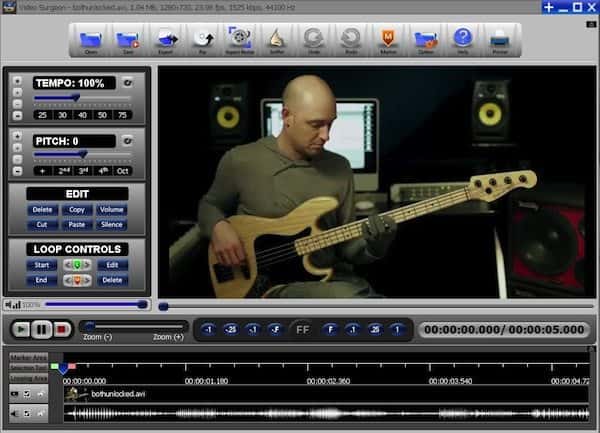
Video Surgeon is video motion analysis software that is marketed towards anyone that uses video material for teaching, coaching or learning. This software allows the user to capture, slow down/speed up, loop, transpose, zoom and freeze video frame by frame. Motion analysis software is extensively used in the professional sports industry to capture, study and analyze athletic performance. Video Surgeon is now making these tools available to musicians who wish to use these same techniques to improve their musical performances.
 Video Surgeon is a Windows based program (Currently beta testing with the Mac version and it should be available in about a month’s time) that is available via digital download from the manufacturer. The process of downloading, installing and activating the software was quick and easy.
Video Surgeon provides an extensive amount of support documentation which includes a user guide, a quick start guide, a selection of training videos and a help desk. Since I have used another TMJ created product “Song Surgeon” extensively, I found the interface and various options to be quite similar and was quickly up and running. For those that are new to either program, I would recommend that you take the time and step through the various guides to become familiarized with the wide variety of options available to the user.
All video manipulations are performed and viewed from a single screen. Selectable icons are available on the top of the screen providing access to drop down menu driven commands with additional adjustable parameters on the left side of the screen.

Video Sources
Video Surgeon can open and view most of the common video file formats including: avi, mp4, m4v, mpg, mpg2,mov, flv, mkv, wmv, mts and rm. Video Surgeon will also save a projects as a Video Surgeon Project file (.vsp file). Video Surgeon can access these files from your hard drive, a camera, rip them from an unprotected DVD, or download from the internet.
SBL100
SBL50
SBL25Zoom
Video Manipulation
Tempo
Video Surgeon can slow the tempo to 25% of the original speed or speed it up to a maximum of 200% of the original tempo. There is both a slider control for quick adjustments and step buttons for finer adjustments.
- Pitch
Pitch can be increased or decreased by a maximum of 12 half steps (one full octave) in either direction. The pitch parameter has the same slider and step buttons for adjustment.
- Looping
Start and stop points for looping can be set by either playing the songs and pressing the start and end buttons at the appropriate time or by clicking on the “Edit button” and manually keying in the time designation for the start and stop points of the loop. The timeline area can be expanded (zoomed in) to allow for more precise set points. - Markers
Markers can be added to allow the user to quickly locate a position within an open file. Markers can also be repositioned by dragging. - Playback Controls
There are buttons for play, pause, and stop. There is a volume slider and a zoom slider for magnifying the video image. There is also a set of Freeze Frame Buttons that allow the user to incrementally step through the paused video either by one frame at a time or by designated increments of .1 second, .25 seconds or 1 second intervals.
- Aspect Ratio
Video Surgeon has a button in the Top Menu that allows the user to change the size and aspect ration of the open video. This is important, because some videos have different aspect ratios and would appear distorted without the ability to adjust this parameter. - The Youtube Sniffer
This is one of the coolest features of Video Surgeon. The sniffer allows the user to download videos from Youtube into Video Surgeon for manipulation. Having worked with Song Surgeon for a while now, I realize the magnitude and difficultly of this task. Youtube is continually changing parameters and Video Surgeon is constantly being updated to meet these new requirements. Note: there is also a Main Sniffer for non-Youtube videos. - Editing
Video Surgeon provides additional editing capabilities of Cut, Copy, Paste, Delete, Silence and Synchronous and Asynchronous Editing.


In Use
A video file can be loaded either from the hard drive or from Youtube via the Youtube sniffer. While the video is playing, starting and stopping loop points can be readily set by clicking the appropriate button at the desired time. The start and stop times can be further refined and adjusted by clicking the Edit button which allows for entering more precise numerical data. When slowing down a part, the audio and video remain at a high level of quality (as long as the initial audio and video was of high definition). I found Video Surgeon to be easy to use and a valuable tool for musicians that aspire to learn new musical phrases and techniques from video recordings. For more information go to: Video Surgeon
Note: I wish to thank James Todd (Founder/Owner of TMJ, Inc.) for his assistance with the production of the exported video clips. My computer is a few generations behind the bleeding edge and experienced some technical difficulties at the most inopportune of times. I also want to send a Shout Out to Scott Devine for giving me permission to use clips of his video lesson in the examples.


Gear Reviews
Review: Neural DSP Darkglass Ultimate… From Signature Tone to Full Production Ecosystem


For years, the Darkglass name has been closely tied to the evolution of modern bass tone. From tight, aggressive drive to articulate low-end clarity, its sonic fingerprint has become a staple across heavy, progressive, and even crossover genres. With the release of Darkglass Ultimate, Neural DSP takes that familiar identity and pushes it far beyond amp simulation, delivering something that feels less like a plugin and more like a complete bass production environment.
This isn’t just an update. It’s a shift in scope.
Expanding a Proven Foundation
When Neural DSP first introduced the Darkglass plugin line in 2018, the goal was straightforward: capture the essence of the brand’s most iconic pedals in a digital format. The Darkglass B7K Ultra bass preamp pedal and Darkglass Vintage Ultra bass preamp pedal formed the backbone of that effort, offering two distinct but complementary tonal philosophies.
Darkglass Ultimate retains those core voices, but places them inside a much broader framework.
The B7K side still delivers its signature precision… tight low end, defined attack, and an aggressive edge that cuts cleanly through dense arrangements. In contrast, the Vintage circuit leans toward a more rounded, harmonically rich response, evoking the feel of classic tube amplification without becoming overly soft or indistinct.
More importantly, these tones don’t feel like endpoints. They act as foundations, strong, mix-ready starting points that encourage further shaping rather than requiring corrective work.
Beyond Amp Simulation
Where Darkglass Ultimate separates itself from earlier iterations is in how much ground it covers. Instead of focusing solely on preamp and cabinet emulation, it builds a complete signal chain designed to take a bass part from initial idea to final production, without leaving the plugin.
The pre-effects section is comprehensive, including compression, envelope-based filtering, octave layering, and fuzz. These aren’t treated as add-ons; they’re integrated into the signal path in a way that feels intentional and musical, encouraging experimentation from the very first note.
Post-effects expand that palette further. Modulation and delay are implemented with a level of quality that invites actual use rather than occasional novelty. In particular, the delay stands out, not just as a functional tool, but as a genuinely inspiring one. It adds space and movement without overwhelming the fundamental tone, making it surprisingly effective even in contexts where bass delay might typically feel excessive.
Cabinets, EQ, and Precision Control
The cabinet section introduces modeled Darkglass enclosures, including the DG210C (2×10) and DG810ES (8×10). Combined with adjustable microphone placement, this allows for detailed tonal shaping at the final stage of the signal chain.
Supporting this is a robust EQ architecture. Between the onboard controls inherited from the original pedal designs and a dedicated 9-band graphic EQ, there’s significant flexibility available. Subtle corrections, surgical adjustments, or more dramatic tonal shifts are all within reach, depending on the needs of the track.
This level of control makes it possible to move quickly from raw tone to mix-ready sound, often without relying on additional processing.
Presets That Go Beyond Genre
Preset libraries can often feel like filler, but that’s not the case here. Contributions from players such as Adam “Nolly” Getgood and Alex Webster highlight the plugin’s strengths in heavier styles, offering polished, aggressive tones that sit naturally in a mix.
At the same time, the in-house presets from Neural DSP broaden the scope considerably. There are synth-inspired textures, ambient layers, funk-driven tones, and deliberately extreme fuzz patches that push the plugin into more experimental territory.
The result is a tool that resists being boxed into a single genre. While its roots are clearly in modern rock and metal, its capabilities extend well beyond that space.
Workflow and Usability
One of the most compelling aspects of Darkglass Ultimate is how efficiently it integrates into a working environment. Built-in utilities, such as a tuner, metronome, and transpose function, may seem like small additions, but they contribute to a smoother, more self-contained workflow.
In practice, the plugin performs reliably and responds quickly. Recording sessions feel fluid, and tones translate well into a mix with minimal additional processing. That immediacy is a major advantage, particularly for players working in home or project studio settings where speed and simplicity matter.
From Studio to Stage
Although clearly designed with recording in mind, Darkglass Ultimate also opens the door to live applications. With the addition of a MIDI controller, it can function as a highly adaptable performance rig, offering real-time control over effects, presets, and signal routing.
For players comfortable incorporating a laptop into their setup, this creates a powerful alternative to traditional hardware-based rigs, especially when portability and flexibility are priorities.
A Logical Evolution
Darkglass Ultimate doesn’t abandon what made earlier versions successful; it builds on it. The core tones remain intact, but they’re now part of a much larger system designed to support the entire creative process.
Rather than thinking of it as a plugin that emulates a pedal, it makes more sense to view it as a production tool centered around a specific tonal identity. One that starts with the recognizable Darkglass sound, but doesn’t stop there.
For bassists who want a streamlined path from idea to finished track, and the flexibility to explore along the way, it represents a significant step forward in how software can support both tone and workflow.
Visit online at neuraldsp.com/
Disclaimer: This pedal was kindly provided by Origin Effects for the purpose of this review. However, this does not influence our opinions or the content of our reviews. We strive to provide honest, unbiased, and accurate assessments to ensure that our readers receive truthful and helpful information.
There’s a certain kind of bass tone that doesn’t shout for attention, yet somehow defines the entire track. You hear it on records where everything just sits, where the low end feels effortless, supportive, and impossibly musical. It’s rarely about aggression. More often, it’s about control, warmth, and a sense that the instrument is breathing alongside the band.
That’s the space the BassRig Fifteen occupies.
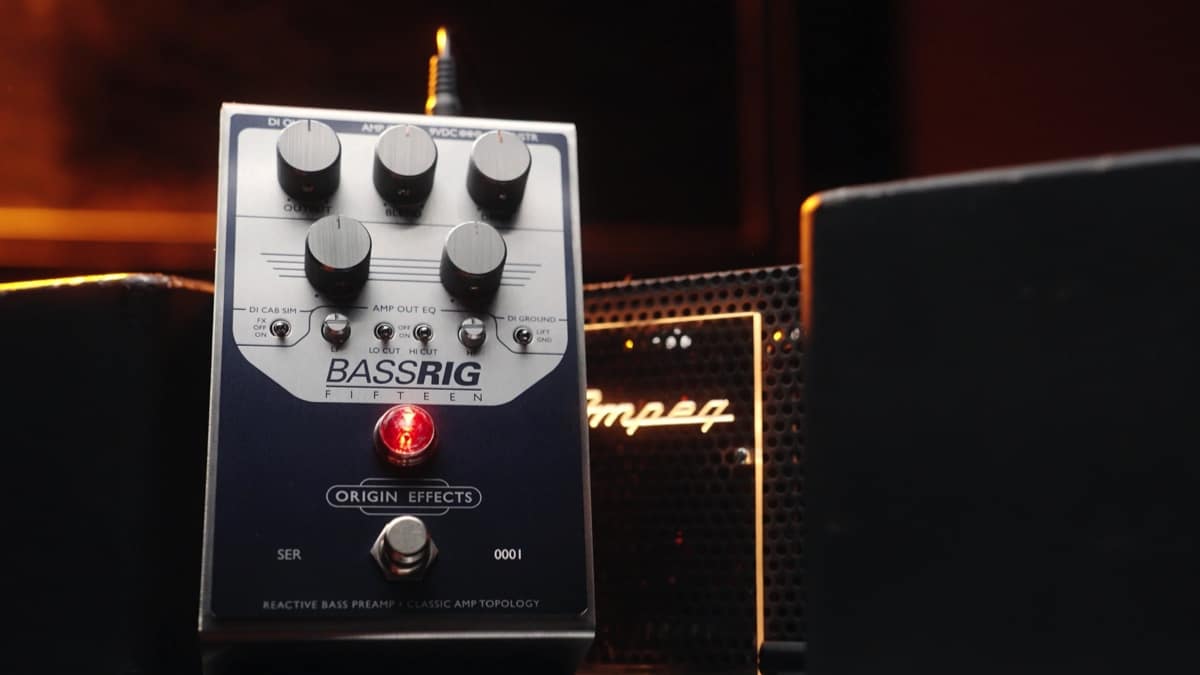
Origin Effects has built a reputation around precision gear that doesn’t just approximate vintage equipment, but attempts to understand it at a deeper level. With the BassRig Fifteen, they’ve turned their attention to one of the most recorded bass amp sounds in history and distilled it into a compact, all-analogue format.
But this isn’t a nostalgia piece. It’s a tool designed for modern players who need that sound without the complications that usually come with it.
From the first few notes, what stands out isn’t a specific frequency or EQ curve; it’s the way the pedal responds. There’s a softness to the transient, a subtle compression that feels organic rather than imposed. Notes bloom rather than snap, and even simple lines take on a sense of weight and intention.
It doesn’t behave like a typical pedal. In fact, thinking of it as an “effect” feels slightly misleading. The BassRig Fifteen is closer to a front-end, something that reshapes the entire way your instrument interacts with the rest of your signal chain.
Push it gently, and it rewards you with rounded, articulate lows and a smooth top end that never gets brittle. Dig in harder, and the texture thickens, introducing harmonic complexity without tipping into anything that feels overly saturated. It’s a very specific kind of drive, more studio saturation than stage distortion.
One of the most impressive aspects is how easy it is to maintain clarity. Bass players are used to compromise when adding gain, losing low-end definition, or watching their sound disappear in a mix. Here, that trade-off feels largely absent. The core of your tone remains intact, even as the character evolves around it.
This makes the pedal particularly compelling in recording scenarios. Plugging directly into an interface via the built-in DI yields a sound that already feels “finished.” There’s a natural sense of space and balance, as though a cabinet has already been carefully mic’d and placed. It doesn’t require much in the way of corrective EQ or additional processing to sit correctly.
Live, that same consistency becomes a different kind of advantage. Engineers get a predictable, mix-ready signal. Players get the reassurance that their tone isn’t being left to chance night after night.
What’s interesting is how restrained the whole experience feels. In an era where many pedals compete on extremes, more gain, more options, more everything, the BassRig Fifteen takes a narrower path. It focuses on doing one thing exceptionally well, and trusts that players will understand the value in that.
That doesn’t mean it’s limited. There’s enough flexibility to adapt to different instruments, playing styles, and rigs. But the boundaries are intentional. This isn’t about radically transforming your sound; it’s about refining it.
And that distinction matters.
For players chasing vintage-inspired tones, the appeal is obvious. But even outside of that world, there’s something to be said for a piece of gear that prioritises feel over spectacle. The BassRig Fifteen doesn’t demand attention; it earns it over time, through consistency and musicality.
It’s not the kind of pedal that reveals everything in the first five minutes. Instead, it gradually integrates itself into your playing, shaping your touch and subtly influencing how you approach the instrument.
In the end, that might be its greatest strength.
Because while there are plenty of pedals that can impress, far fewer can disappear into your sound in a way that makes you forget they’re even there.
Available online at Amazon.com
Disclaimer: This pedal was kindly provided by Donner Music for the purpose of this review. However, this does not influence our opinions or the content of our reviews. We strive to provide honest, unbiased, and accurate assessments to ensure that our readers receive truthful and helpful information.
Triple Threat… A compact burst of analog attitude with unexpected appeal for bass players.
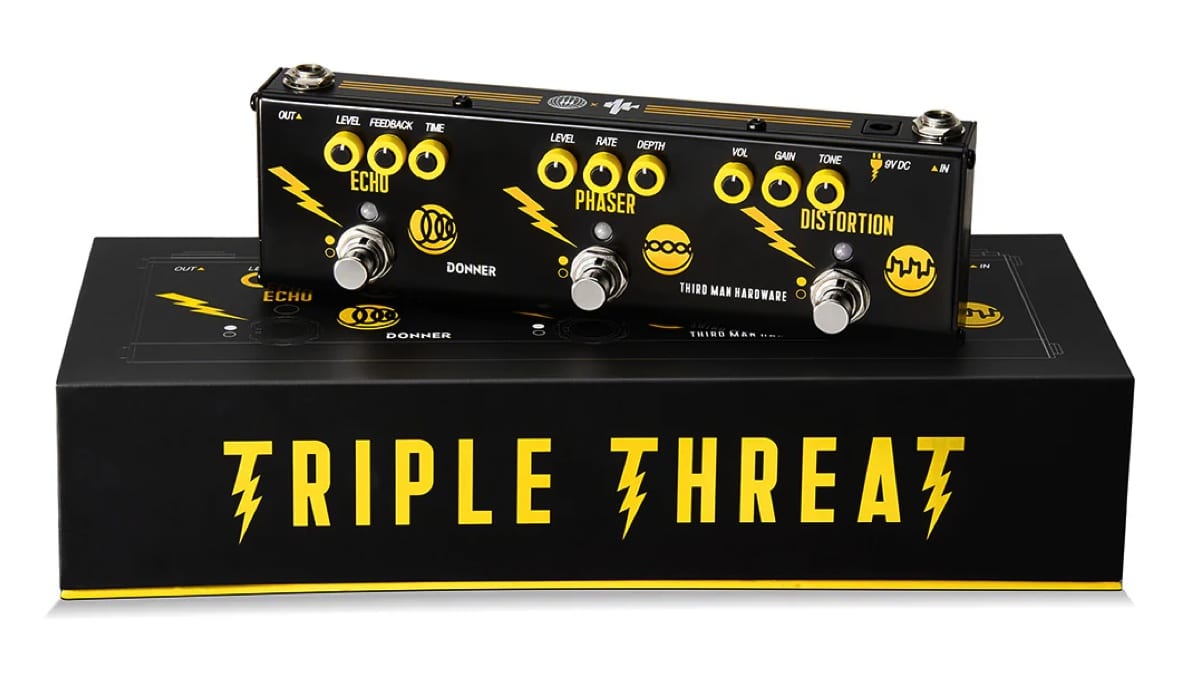
Multi-effects pedals are not usually the first stop for bassists. Most of us build our rigs piece by piece, choosing pedals that preserve low end and offer precise control. The Donner Triple Threat Pedal, created in collaboration with Jack White’s Third Man Hardware, takes a very different approach. It keeps things simple: distortion, phaser, and echo, all in one compact unit, with no menus or deep editing, just knobs and footswitches.
At first glance, it feels like a guitar pedal through and through. But spend a little time with it on bass, and it starts to reveal a different kind of usefulness, less about precision, more about character.
Built around simplicity
The Triple Threat is all about immediacy. Each effect has its own dedicated controls and footswitch, making it easy to dial in sounds quickly without overthinking the process. There’s something refreshing about plugging in and getting straight to experimenting, especially for bass players who are used to more complex signal chains.
The compact enclosure makes it easy to fit onto almost any pedalboard or even use as a standalone unit for rehearsals and smaller gigs. That said, the small size does mean the knobs are quite tight and not the easiest to adjust mid-performance. It’s a minor compromise, but one that becomes noticeable on a dark stage.
Analog character
Rather than aiming for clean, studio-like tones, the Triple Threat leans into a more raw and expressive sound. This becomes particularly apparent in the distortion section. It delivers a gritty, garage-inspired voice that can add real personality to a bass line, especially in indie or lo-fi contexts.
On bass, the key is restraint. Lower gain settings bring out a nice edge without sacrificing too much low end, while higher settings can start to thin things out. Without a blend control, there’s no easy way to bring back the fundamentals once it’s gone, so it rewards a lighter touch.
The phaser is more immediately cooperative. With slower rates and moderate depth, it adds movement without overwhelming the core tone. It’s the kind of effect that works best when you don’t notice it right away, but feel it sitting underneath the groove.
The echo section stands out as the most naturally suited for bass. It’s warm, slightly dark repeats sit comfortably behind the dry signal, adding space without clutter. Whether used subtly or pushed into more ambient territory, it complements the instrument rather than competing with it.
Real-world perspective
The Triple Threat has also found its way onto the pedalboard of Dominic John Davis, bass player for Jack White, which gives some insight into how it functions in a professional setting.
Looking at his broader setup, typically including tools like the Boss TU-3 Chromatic Tuner, MXR M108 Ten Band Graphic EQ, and boutique pedals such as the Mantic Effects Vitriol and Mantic Effects Isaiah Delay, it becomes clear that the Triple Threat isn’t a centerpiece. Instead, it serves as a flexible addition, a way to access a few extra textures without expanding the pedalboard further.
That context is important. For bass players, this isn’t about replacing carefully chosen pedals, but about adding something a little different to the mix.
Versatility in practice
In practical use, the strength of the Triple Threat lies in how quickly it lets you shift between sounds. Having three effects available at your feet without needing multiple pedals can be surprisingly useful, especially in stripped-down setups.
It’s easy to imagine it being used in rehearsals, smaller gigs, or situations where portability matters. It also lends itself well to experimentation, encouraging players to step outside their usual tonal comfort zones.
At the same time, its limitations remain part of the experience. The distortion’s guitar-oriented voicing and the absence of a blend control mean it won’t satisfy players looking for a fully optimized bass overdrive. Instead, it offers something a bit less predictable, and that’s part of its charm.
The Donner Triple Threat Pedal isn’t trying to be a precision tool, and it doesn’t need to be. What it offers is a straightforward, character-driven set of effects that invite exploration.
For bass players willing to approach it on those terms, it can be a surprisingly inspiring addition. It won’t replace a dedicated pedalboard, but it can add texture, movement, and a bit of unpredictability in a way that feels immediate and fun.
For more information, visit online at donnermusic.com
Disclaimer: This pedal was kindly provided by Valeton for the purpose of this review. However, this does not influence our opinions or the content of our reviews. We strive to provide honest, unbiased, and accurate assessments to ensure that our readers receive truthful and helpful information.
Two Paths to the Same Goal: Better Workflow, Real Control
Valeton’s GP series has followed a clear and consistent trajectory. The GP-5 introduced the core sound engine in an ultra-compact, app-driven format, proving that solid tones could exist in a minimal footprint, but at the cost of hands-on control. The GP-50 took a major step forward by adding onboard editing and a second footswitch, making the platform far more usable without relying on external devices.
With the GP-150 and GP-180, Valeton shifts the focus again, this time toward how players actually interact with their sound while playing.
These aren’t about reinventing the tone engine. They’re about making it more accessible, more flexible, and ultimately more musical in real-world use.
It’s also worth noting that while these pedals build on workflow ideas introduced in smaller GP units like the GP-5 and GP-50, the GP-150 and GP-180 are more closely related to the GP-100 platform, positioned as more complete, floorboard-style solutions rather than compact multi FX.
The Big Picture
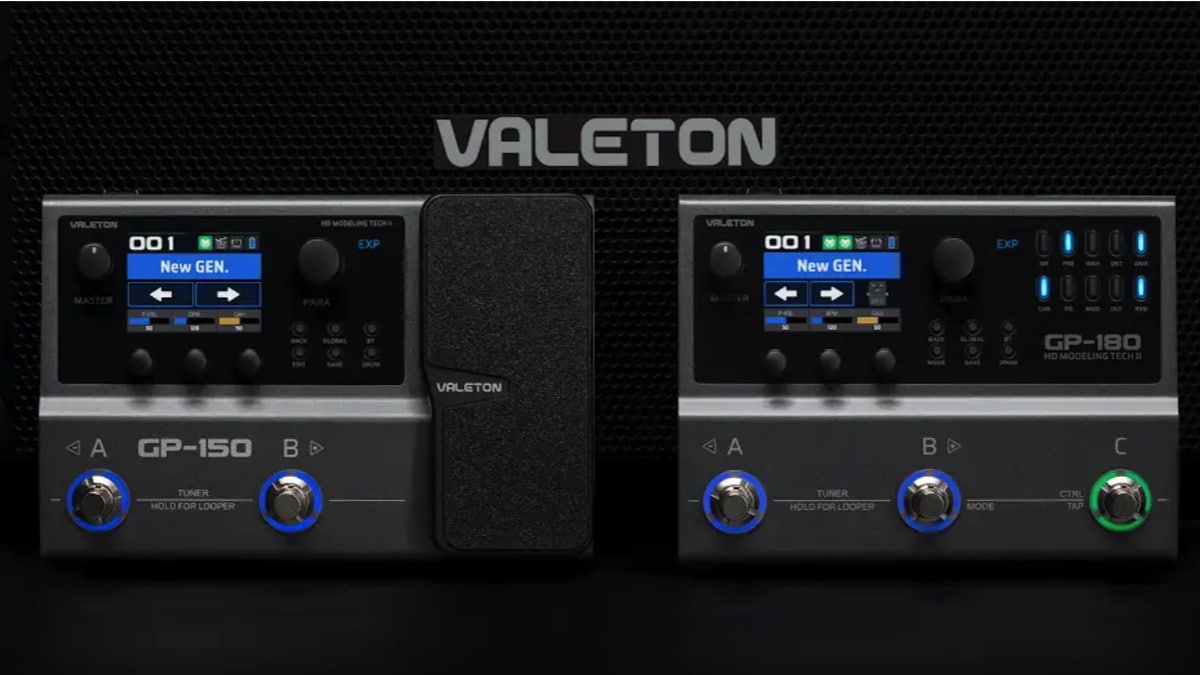
Both the GP-150 and GP-180 share the same core foundation:
- 200+ effects
- NAM (Neural Amp Modeler) support
- IR loading (up to 20 files)
- 12-module fully flexible signal chain
- Looper (180 seconds) and drum machine
- USB audio interface and Bluetooth connectivity
- Built-in rechargeable battery
So in terms of sound and raw capability, they’re very similar.
The real difference comes down to workflow and control.
GP-150: Compact Rig with Real Expression

The GP-150 is where the platform starts to feel like a proper, self-contained rig.
The standout feature here is the built-in expression pedal. That alone changes how you use the unit. Instead of just switching presets or toggling effects, you can actively shape your sound in real time… volume swells, wah, parameter control… it’s all immediately available.
Combined with dual footswitches and onboard editing, the GP-150 strikes a strong balance
between portability and control. It carries forward the independence introduced in the GP-50,
but expands it into something more expressive and complete.
It’s especially appealing for players who want a minimal setup that still feels dynamic and
responsive.
GP-180: Hands-On Control, Pedalboard Feel

The GP-180 takes a different approach. Instead of adding expression, it doubles down on direct
control.
The addition of a third footswitch already makes navigation more natural, but the real shift
comes from the dedicated effect block buttons.
Each block has its own button, which lights up when active and can be toggled instantly. That
means you can turn distortion, delay, modulation, or reverb on and off with a single press—no
menu diving, no reassignment needed.
In practice, this makes the GP-180 feel much closer to a traditional pedalboard. You’re not just
switching presets, you’re interacting directly with your signal chain, something that wasn’t really possible with the more minimal GP-5 or even the GP-50.
For live use, that immediacy makes a big difference.
Tone & Real-World Use
Both units share the same sound engine lineage, and overall quality remains strong.
There are more effects available compared to earlier models, and the addition of NAM support
opens the door to more realistic amp tones and modern workflows.
One of the most noticeable improvements, particularly for bass players, is the octave tracking. Lower octave sounds are significantly tighter and more usable than in earlier GP units like the GP-5, making them far more practical in a mix. Higher octaves still feel a bit clunky, but the improvement where it matters most is clear.
In terms of real-world use, both pedals are flexible enough to cover practice, recording via USB, direct-to-PA live setups, and compact fly rigs.
That said, they cater to slightly different players.
Which One Should You Choose?
Go for the GP-150 if:
- You want a compact, all-in-one unit
- Expression control is important to your playing
- You prefer a streamlined setup with minimal footprint
Go for the GP-180 if:
- You play live and need faster, more direct control
- You prefer a pedalboard-style workflow
- You want to toggle effects individually rather than relying on presets
The GP-150 and GP-180 aren’t competing pedals; they’re two different interpretations of the same idea.
The GP-150 focuses on expression and portability, giving you a compact rig that still feels
dynamic and interactive, something that builds directly on the usability improvements
introduced after the GP-5.
The GP-180 focuses on control and immediacy, turning the GP platform into something that
feels much closer to a traditional pedalboard.
Both share the same solid tonal foundation, but they approach usability in different ways.
And that’s really what this generation of the GP series is about, not just sounding good, but
feeling right under your hands and feet.
Visit online at valeton.net/


Disclaimer: This bass strap was kindly provided by Italia Leather Straps for the purpose of this review. However, this does not influence our opinions or the content of our reviews. We strive to provide honest, unbiased, and accurate assessments to ensure that our readers receive truthful and helpful information.
I’ve spent years searching for the perfect wide bass strap, something that delivers both comfort and durability without compromising on style. That search ended nearly two decades ago when I discovered Italia Leather Straps.
Handcrafted in the USA from premium Italian leather, Italia Straps offers an impressive range of straps for both bass and guitar players. What immediately stood out to me was the exceptional craftsmanship; every detail, from stitching to material selection, reflects a commitment to quality. These aren’t just accessories… they’re long-term investments for serious musicians.
After more than 19 years of consistent use with my original strap, I can confidently speak to its longevity and comfort. Even under the demands of extended performances, the support provided by a 4” wide strap makes a noticeable difference.
In this review, I’m taking a closer look at the 4” Elite Series Leather Backed Bass Strap, now available in a sleek new Slate Black finish. It’s a refined addition to an already outstanding lineup, combining aesthetic appeal with the same trusted performance.
For more information, visit www.italiastraps.com.

Right Hand Technique Strategies with Dr. Randy Kertz

New Music: Golden Flower, Are You Even Awake?

Interview With Bassist Adam Russell

Interview With Bassist Tim Neilsen

Gear News: Fender Unveils Highly Anticipated Vintera III Series
Right Hand Technique Strategies with Dr. Randy Kertz

Mar 16 Edition – This Week’s Top 10 Basses on Instagram
Mar 23 Edition – This Week’s Top 10 Basses on Instagram
Mar 30 Edition – This Week’s Top 10 Basses on Instagram